GST and QST Formula for Excel and Google Sheets
A badly rounded formula in a spreadsheet produces a total that's a cent off a real receipt. Here are the exact formulas, with the rounding step that's missed most often.
The Price Before Tax in a Cell
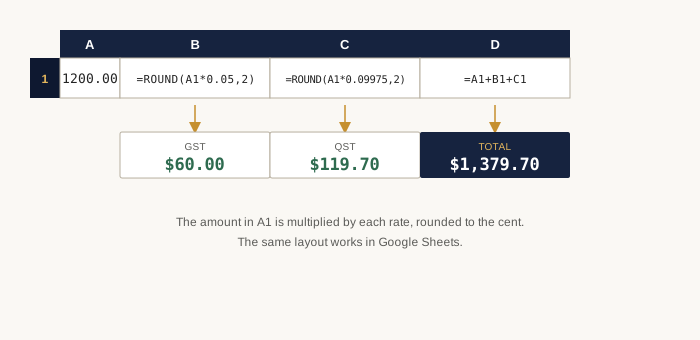
With the price before tax in A1, in Quebec:
- GST:
=ROUND(A1*0.05,2) - QST:
=ROUND(A1*0.09975,2) - Total:
=A1+ROUND(A1*0.05,2)+ROUND(A1*0.09975,2)
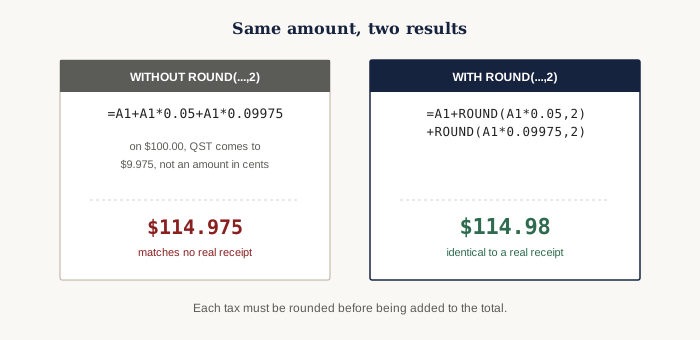
The ROUND(...,2) rounds each tax to the cent before adding it. Without that
rounding, the spreadsheet adds up fractions of a cent you can't see on screen, and the
displayed total can be a cent off a real receipt, a gap that builds up over a long list of
rows.
French-language Excel. If your Excel is set to French (Quebec or
France), the function is called ARRONDI, decimals use a comma, and
arguments are separated by a semicolon: =ARRONDI(A1*0,05;2) for GST and
=ARRONDI(A1*0,09975;2) for QST. Google Sheets follows the file's locale
settings: with French settings, also use the decimal comma and the semicolon.
Check: $1,200.00 before tax, in Quebec
The same sheet gives $1,356.00 for the same $1,200.00 amount in Ontario, where HST
replaces the two lines with one: =ROUND(A1*0.13,2).
One Formula Line per Province
The rate changes; the structure of the formula doesn't. Replacing 0.05 and
0.09975 with the rate you need is enough:
| Province | Tax formula |
|---|---|
| Quebec (GST) | =ROUND(A1*0.05,2) |
| Quebec (QST) | =ROUND(A1*0.09975,2) |
| Ontario (HST) | =ROUND(A1*0.13,2) |
| Nova Scotia (HST) | =ROUND(A1*0.14,2) |
| NB / PEI / NL (HST) | =ROUND(A1*0.15,2) |
| British Columbia (PST) | =ROUND(A1*0.07,2) |
| Manitoba (RST) | =ROUND(A1*0.07,2) |
| Saskatchewan (PST) | =ROUND(A1*0.06,2) |
| Alberta / territories (GST only) | =ROUND(A1*0.05,2) |
The 5% GST is added in every province with a separate provincial tax (Quebec, British Columbia, Manitoba, Saskatchewan): a second formula line is needed in those four cases, just like for QST above.
Finding the Price Before Tax from a Total
With the total amount in B1, divide by 1 plus the combined rate, rather than
subtracting a percentage, then round to the cent:
- Quebec:
=ROUND(B1/1.14975,2) - Ontario:
=ROUND(B1/1.13,2) - Nova Scotia:
=ROUND(B1/1.14,2) - NB, PEI and NL:
=ROUND(B1/1.15,2) - British Columbia and Manitoba:
=ROUND(B1/1.12,2) - Saskatchewan:
=ROUND(B1/1.11,2) - Alberta and the territories:
=ROUND(B1/1.05,2)
Subtracting 14.975% from a total instead of dividing it by 1.14975 gives too low a result: the percentage applies to the price before tax, not the total. The guide details this formula for all thirteen provinces and territories.
Without Opening a Spreadsheet
For a one-off calculation, the sales tax calculator automatically applies the right rate for the province you choose, in both directions.
Related Articles
-
Calculating GST or QST on Their Own
Isolate just one of Quebec's two taxes, without going through the 14.975% combined rate, useful for a tax return or an out-of-province purchase.
-
Calculating Tax on a Self-Employed Worker's Invoice
The $30,000 registration threshold, mandatory information on the invoice, and a full worked example.
-
Calculating Tax on a Used Car in Quebec
For a private sale, only QST applies, calculated on the sale price or the vehicle's estimated value, whichever is higher.
-
Calculating Sales Tax in Ontario: the 13% HST
A single 13% rate: one formula is enough, without splitting out the federal share.
Sources
- Revenu Québec · Tables of GST and QST rates
- Canada Revenue Agency · GST/HST rates and place-of-supply rules
Article provided for informational purposes, current with the rates in effect in 2026. CalculatriceTaxes.ca is an independent site, not affiliated with the Canada Revenue Agency or Revenu Québec.